
Searching Cases by Name
For the Zapata County District Clerk, the local route is the iDocket main menu. It lets the public search by litigant name or by cause number. Pick the county and court first, then type a last and first name. Spelling only part of a name widens the net. When the spelling is a guess, Soundex helps. It matches names that sound alike, though every hit still deserves a close look.
One name can pull up many people. Narrow the field with case category, court, filing range, and the role each litigant played. If nothing comes back, drop an initial or loosen a tight date range. If too much comes back, add those same fields back in.
- Open iDocket and choose the name search.
- Select Texas, Zapata County, and the likely court.
- Enter the last name, then add a first name or initial.
- Use case type, role, or dates to narrow matches.
- Open the matching entry and record its cause number and court.
| Field | Type | Required | Notes |
|---|---|---|---|
| County | Selection | Yes | Choose Zapata. |
| Litigant | Text | Yes | Partial spelling or Soundex may help. |
| Court/category | Selection | No | Use civil, criminal, or the known court. |
| Date range | Date | No | Help examples use MM/DD/YYYY. |
Zapata County Court Comes First
Which court has the file decides which database can verify it. The Zapata County District Clerk holds the 49th Judicial District Court's files. Those cover civil, criminal, family, and juvenile matters. Probate, wills, guardianship, and county civil or criminal work belong to the County Clerk. Citations, small claims, forcible detainer, and other justice matters sit elsewhere. They fill four separate JP precinct dockets.
That split is why searches come up empty. A district search cannot stand in for the right JP precinct. The County Clerk's public-record endpoint is not the district docket either. If the court is a mystery, clues abound. The case type, the citation, a filed paper, or a hearing notice usually points to the right first call.
Searching by Case Number
Every court assigns its own cause number, and that number is the key identifier. Type it exactly as issued, keeping the letters, the punctuation, and any leading zeros. Zapata County has no single published case-number pattern. So treat a model like YYYY-XX-##### as an illustration only, never as the local format. Without a number, search by party name or ask the right clerk directly.
Check that the number matches the court and case category shown in the result. Justice courts often run citation numbers through a separate payment system. A number GovRec accepts may not be the identifier that pulls a full iDocket history.
Note: Copy a cause number straight from an official notice or search result. Do not rebuild it from the filing year.
Zapata County iDocket Access
Searching the Zapata County court docket through iDocket works two ways. iDocket public-search help lays out the split. A guest can run a docket search by litigant name. That search pulls up a case number. Anything deeper may call for registration, a subscription, or county participation. Deeper items include case history, document images, court calendars, and fee records. One caution deserves care. If an image is missing from the entry, that does not mean no document was filed with the clerk.
The iDocket menu shows the official set of tools. Those tools serve Zapata County case lookup.
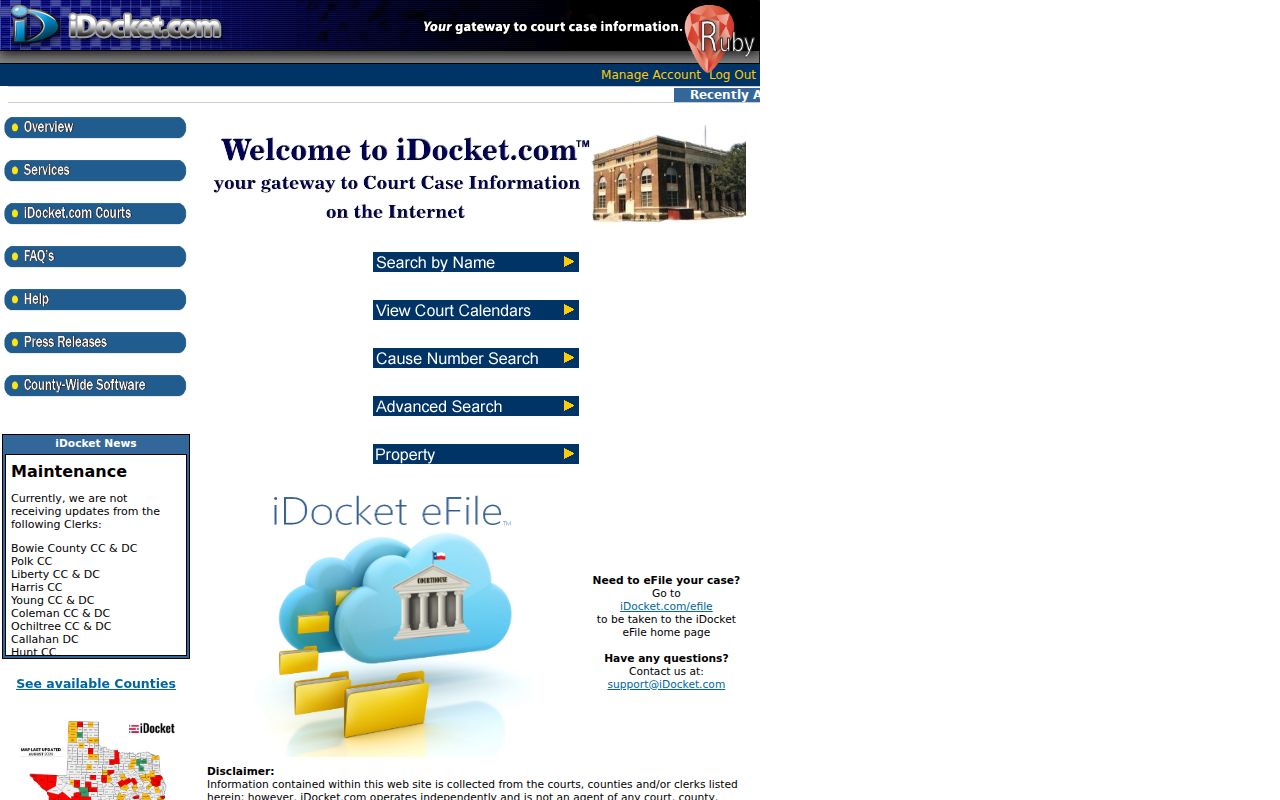
Name, cause-number, advanced, and calendar searches are separate choices on the menu, so one screen may not answer every question about a case.
What a Case Search Returns
A Zapata County case search often shows index facts before the full case file. iDocket describes case history as documents or actions, motions, orders, answers or citations, costs, payments, and ledger events. That ledger is the money trail of assessments, credits, receipts, and refunds. Results can also list the filed date, category, parties, court, and status.
| Cause Number | The exact court identifier. |
|---|---|
| Case Style | The public caption or parties. |
| Case Type | A civil, criminal, family, juvenile, or other category. |
| Case History | Actions, orders, motions, and financial entries released by the portal. |
| Status | A label to verify against the order or clerk record. |
A "closed" or "disposed" label is metadata, not the ruling itself. When the exact outcome matters, request the order from the clerk.
Soundex and Date Filters
Spelling and dates can make or break a Zapata County search. Soundex is a phonetic tool that hunts for names that sound alike. It may surface alternate spellings, but it can drag in unrelated records too. Judge each hit by court, role, and case type rather than trusting a similar name.
Advanced fields cover a lot of ground. They can include attorney name, first initial, litigant role, filing date, disposition date, category, and case type. Go broad when the filing date is unknown. Then apply one limit at a time. That way you can see which filter killed a possible match. It also keeps the docket search tied to the right court.
Statewide vs County Case Search
re:SearchTX is the statewide layer covering participating Texas courts, with searches across cases, filings, and hearings plus document purchase and saved-case tools. Locally, iDocket serves as the Zapata County District Clerk system. The County Clerk separately links LGS Online Solutions for its records.
| Statewide re:SearchTX | Zapata County Paths |
|---|---|
| Useful when county or court is uncertain. | iDocket is the district search path. |
| Coverage and images vary. | LGS is linked for County Clerk records. |
| May show filings, hearings, and documents. | The responsible clerk verifies the source record. |
Search both layers when needed, since state integration does not guarantee every historical case, restricted matter, or document image.
Zapata County Calendar Limits
Case history and calendar data answer different questions. iDocket warns that history may omit hearing dates when a coordinator keeps the calendar. The 49th District Court posts an official 2026 date notice. It lists court dates, not the full filing history of each case.
A missing calendar row does not erase a filing. A listed setting does not prove a hearing happened or that the case ended. Confirm any time-sensitive setting with the court. Then turn to the case file for disposition details.
Access and Restricted Cases
Not every Zapata County court record is open to everyone. Texas Rule 21c keeps sensitive data out of filings. It can also black the data out before anyone sees it. Cases involving juveniles get extra protection through Family Code Chapter 58. Two more tools can narrow the public docket. An expunction under Code of Criminal Procedure Chapter 55A wipes a case from view. A nondisclosure order under Government Code Chapter 411 hides it from most searches.
Partial restrictions happen too. An index entry may stay public. A sealed exhibit stays hidden, and some matters never show up in guest search at all. Getting access to those files takes a formal process the court allows. More searching will not unlock them.
Offline Zapata County Search
Want records in person or by phone? The District Clerk sits in Suite 119 at 200 E. 7th Avenue, Zapata, TX 78076-0788, and answers at (956) 765-9915? No, dial (956) 765-9930 for 49th District Court matters. The County Clerk works out of Suite 138 at (956) 765-9915. Justice court items, such as a traffic ticket from a particular precinct, go through the contact listed on the Justice Courts page for the precinct that issued the case.
Both clerk offices publish mail and fax options. Confirm first that the office accepts that channel, which fee applies, and which identifiers it wants. For qualifying judicial records beyond ordinary case files, a written Rule 12 request is the proper tool. Name the court, the cause number or style, the dates, the document type, and how you want it delivered, and keep any written denial or narrowed reply for your files.
Get organized before you call. Have the case style, a rough filing date, the party role you know, and the exact docket period you need. Ask if the file is on site, if a public image exists, and if a search or copy charge applies. Clerk staff will pull public records and walk you through office procedure. They cannot give legal advice.
Know what you are asking for, too. A docket sheet, a document image, and a calendar setting are three different products, and asking for the wrong one can leave you with an index when you needed the signed order. Federal cases tied to Zapata County do not run through either county clerk; they live in PACER and the Southern District of Texas Laredo Division. Ask each office directly about public terminals, same-day copies, and email requests, since services vary.